
Shopping list voice input
TK SolutionShopping
4.811.00K Reviews
- Version
- 5.8.71
- Installs
- 1.00M
- Age Rating
- Everyone
Screenshots
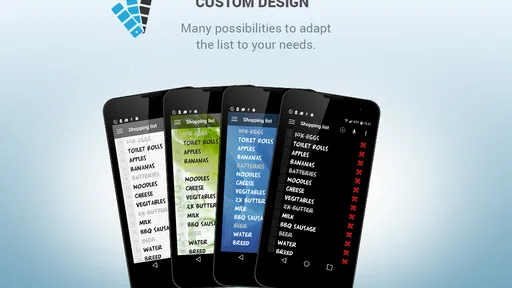
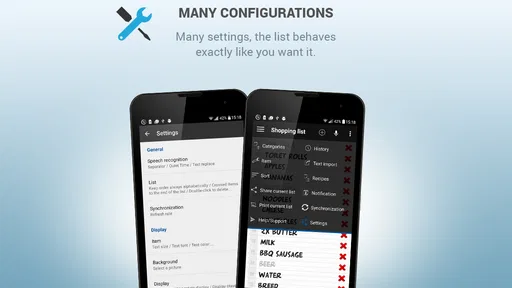
Our Review of Shopping list voice input
 Analysis by Appyee
My first question with any grocery-list app is simple: does it make the moment between noticing an empty cupboard and buying a replacement easier, or does it add another chore? Shopping List Voice Input is a free shopping app from TK Solution, built around capturing items by speaking rather than typing. It has a 4.8 average from around 146,000 ratings, and over one million installs. Those numbers suggest it has found an audience, but the more useful test is whether its voice-first approach suits the way you actually shop.
Choose by how you make a list
I’d start by thinking about when you usually add groceries. If you remember items while cooking, cleaning, or putting things away, speaking can be quicker than opening a keyboard and typing each one. If you make a careful list at a desk, prefer detailed notes, or already have a routine in another app, voice input may not offer enough benefit to justify switching.
The app’s main appeal is reducing small interruptions. A spoken list can be useful when your hands are wet from cooking, you’re carrying something, or you want to note an item before the thought disappears. It is less compelling for people who want a full meal-planning system, recipe storage, or elaborate household inventory. I would treat it as a focused way to collect shopping reminders, not assume it replaces every part of organizing a kitchen.
The Ease of Voice Input
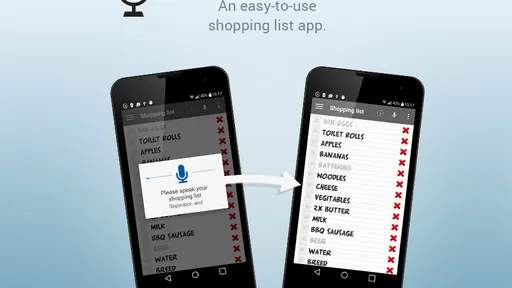
Let’s dive into what makes this app so special. The standout feature, as the name suggests, is its voice input capability. You can simply speak out your list, and boom! It’s all there, neatly organized and ready to go. No more fumbling with your phone keyboard while juggling a grocery cart.
The app recognizes a wide range of items and can even handle complex lists. I tested it with various accents and speeds of speaking, and it performed like a champ every time. Just say “add bananas, bread, and butter,” and it’s done. It’s like having your own personal shopping assistant.
Make voice capture work in real life
The practical advantage is not just speed; it is lowering the effort required to record a passing thought. For example, while putting away groceries, I can notice that the cooking oil is nearly gone and add it immediately instead of trusting myself to remember later. Before leaving, I can review the list and remove anything I no longer need. That quick review matters: voice entry is convenient, but a spoken item can still be misunderstood or captured in an unintended form.
For the cleanest results, I’d dictate short groups of familiar items and pause to check the list afterward, especially when adding similar products or a specific quantity. A voice tool is strongest when it catches ordinary reminders, not when you expect it to interpret a complicated shopping plan perfectly. If you need a particular variety, size, or brand, typing or editing the entry may be clearer than trying to say every detail in one breath.
There is also a useful trade-off in where you use voice. At home, speaking a reminder aloud can feel natural and hands-free. In a crowded shop, on public transport, or around people you don’t know, typing may be more comfortable and discreet. I see voice input as an option that saves effort at the right moment, rather than a reason to stop using the keyboard altogether.
Features You’ll Love
Now, beyond the voice input, there’s a bunch of other cool stuff packed in here. The app syncs across devices, which is super handy if you start your list on your tablet and want to finish it on your phone. It also offers smart suggestions based on your shopping habits. I noticed it started recommending my usual picks like coffee and cereal after a couple of uses.
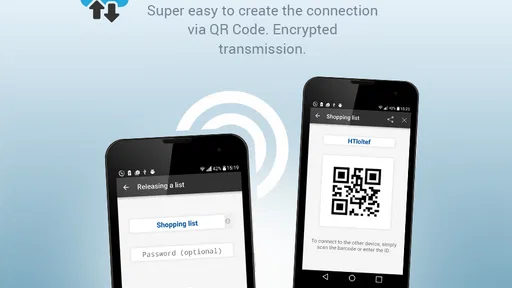
Another neat feature is the ability to share your list. You can easily send a copy to your partner or roommate, ensuring everyone is on the same page. Plus, there’s a handy checklist feature that lets you tick off items as you go, so you won’t accidentally skip anything.
Sharing without creating extra list work
A shared list is most helpful when one person notices what is running low and another person is going to the store. Rather than sending several messages that can get buried, you can give the other shopper a single list to work from. I’d agree on a simple household habit first: add an item as soon as it is noticed, and check it off only after it has gone into the basket. That avoids the common confusion of someone assuming an item has already been bought because it disappeared from the list.
Suggestions based on usual purchases can also reduce repetitive entry, particularly for staples that come back every week. I would still check suggestions rather than treating them as a forecast: a product that is often bought may not be needed this time. The feature is best used as a prompt to consider, not permission to shop on autopilot.
When more than one person maintains a list, consistency matters more than clever organization. Agreeing on recognizable item names and keeping one shared list for the next trip makes it easier to scan than creating separate entries for every small errand. If your household needs detailed assignments, budgets, or a structured meal plan, a general list app with those specific tools may suit you better.
Where other shopping tools may fit better
Compared with a notes app, a dedicated checklist is more directly suited to marking groceries off as you shop. A notes app can be a better choice if you already keep recipes, reminders, and household information together and don’t want another place to maintain. A paper list may still win for someone who prefers to see the whole plan at a glance, avoids using a phone in the store, or wants to hand the list to another shopper without sharing an app.
More elaborate grocery organizers may be preferable when the shopping list is only one part of a larger routine. For example, someone planning meals for several days may want recipes and ingredients connected, while someone tracking pantry supplies may need a fuller inventory. I wouldn’t choose this app on the assumption that voice entry alone covers those jobs. Its strongest case is a quick, approachable list that can be spoken, checked, and shared.
There are limits even within that narrower job. Voice recognition is not a substitute for proofreading, and a list can become untidy if entries are added in a rush and never reviewed. Suggestions can save effort but may also be irrelevant on a particular trip. Sharing is convenient when everyone follows the same list, yet it can create uncertainty if people keep separate copies or do not agree on when to check items off.
What to expect before switching
If you already have a list elsewhere, moving over is less about transferring a complicated system and more about changing a habit. I’d begin with the next ordinary grocery run: add a few items as they come to mind, inspect the result, and use the checklist in the shop. That is enough to learn whether speaking feels faster for you than typing. For a household list, ask the other shopper to try the same routine before relying on it for an important trip.
The app is free to download, with in-app purchases listed at $2.99 per item. It is rated for Everyone, and its current version is 5.8.71; Android users need version 6.0 or later. It has been available since September 19, 2013, which gives it a long history as a straightforward shopping-list option. I’d still make the choice based on the way you shop rather than longevity or popularity alone.
A natural question is whether you can use it without speaking every time. The practical answer is to regard voice as its central convenience, not a requirement for every entry: when speaking is awkward, a typed list or a quick correction is the sensible fallback. Another question is whether it works for a couple or roommate. The sharing feature makes that use case a fit, provided both people keep the same list current and understand how checked-off items are being handled.
Why It Stands Out
So, why choose Shopping List Voice Input over other shopping list apps? For me, it’s all about the simplicity and efficiency. The voice input saves so much time, especially when you’re in a rush or your hands are full. It’s intuitive, user-friendly, and has a clean interface that doesn’t overwhelm you with ads or unnecessary features.
Also, the app’s ability to adapt to your shopping patterns is a real bonus. It feels like it gets smarter the more you use it. Plus, being able to share lists and sync across devices adds a layer of convenience that’s hard to beat.
I would recommend it to someone who regularly remembers groceries at inconvenient moments, shops from a short list, and wants an easy way to share that list with another person. It is also a sensible option for someone who dislikes typing on a phone and is happy to review voice-captured items before heading out. Those small habits are where the app can earn a place in a routine.
I’d skip it if you need grocery planning to connect closely with recipes, pantry quantities, or a broader household task system, or if you would rather keep everything in an existing notes app. People who rarely shop with a phone in hand may also get little from its central convenience. In those cases, a paper list or a more comprehensive organizer may be a better match, even if it takes more effort to set up.
Final Thoughts
All in all, Shopping List Voice Input has quickly become a staple on my phone. It’s one of those apps that you didn’t know you needed until you try it, and then you can’t imagine going back to the old way. Whether you’re a busy parent, a cooking enthusiast, or just someone who loves efficiency, this app is sure to make your life a little easier.
Ready to give it a try? You’ll wonder how you ever managed without it.
Verdict
Strengths of Shopping list voice input
- Quick and easy list creation via voice commands.
- Hands-free operation enhances convenience.
- Supports multiple languages for diverse users.
- Integrates with smart home devices seamlessly.
- Voice recognition is highly accurate.
Limitations of Shopping list voice input
- Limited customization options for list categories.
- Occasional lag in voice command processing.
- Requires internet for optimal performance.
- Voice commands can be misunderstood in noisy environments.
- No offline mode for list access.
Similar Picks in This Category
View All
SHEIN-Shopping Online
Roadget Business PTE. LTD.4.8

Amazon Shopping
Amazon Mobile LLC4.4


Mercado Libre: Compras online
Mercado Libre4.8

Wish: Shop and Save
Wish US Holdings LLC4.7

Alibaba.com - B2B marketplace
Alibaba Mobile4.4
Frequently Asked Questions
What is Shopping List Voice Input and how does it work?
Shopping List Voice Input is a convenient app designed to help users create and manage shopping lists using voice commands. Simply speak the items you need, and the app transcribes them into a list. This hands-free functionality is ideal for multitasking or when you’re on the go.
Is Shopping List Voice Input compatible with all devices?
The app is available for both Android and iOS platforms, ensuring compatibility with most smartphones and tablets. However, it's recommended to check the app's requirements on the respective app store to ensure it runs smoothly on your specific device model.
Can I use Shopping List Voice Input offline?
Yes, Shopping List Voice Input can be used offline, allowing users to create and manage lists without an internet connection. However, some features like cloud synchronization or sharing lists with others may require an internet connection to function properly.
Does Shopping List Voice Input support multiple languages?
The app supports multiple languages, making it accessible to a diverse user base. You can adjust the language preferences in the app settings to match your preferred language, ensuring accurate voice recognition and transcription.
Are there any in-app purchases or subscriptions in Shopping List Voice Input?
While Shopping List Voice Input offers a free version with basic features, there may be in-app purchases available for premium features. These might include advanced customization, ad-free experience, or cloud backup. It's advisable to review these options within the app to decide if they meet your needs.
